
Customer is being throttled (Async)
Introduction
What is a throttle limit/concurrency limit?
Each account has an assigned concurrency limit (also referred to as a throttle limit). For free accounts, the default is 5. For upgraded accounts, the default is 200, but this can be edited for customers should they need it (see Retool guide: How to Use Retool).
A concurrency limit is the number of transcripts that can be processed for that account at any given time. Sometimes a customer may send more transcripts to be processed than their concurrency allows and they will receive an email warning them that they have been throttled.
How does a throttle limit work?
For example, if they are set to 200 and send us 201, they will receive a throttle alert email and 200 will begin to process immediately while the 201st one will wait until one of the previous 200 have finished.
How can I know if a customer is being throttled?
To validate the reason a customer is being throttled and to see if they are currently throttled review the procedures below.
A customer exceeding concurrency means those additional requests will take a little longer than usual, but they will all still get processed. Throttled jobs go into a queue until processing jobs have been completed. Each time a current job finishes, one of the jobs from the queue will begin processing to replace it. That process repeats until all queued jobs have been run.
To check if a specific customer is throttled, head to this chart in Datadog and set the time period to the one you’d like to investigate. Any customers that have been throttled during that time period will have their account ID show up in the list, which you can cross-reference with Retool to confirm a throttled status for someone.
If a customer is still experiencing long processing times, but they don’t show up in this list, it’s likely that it could be due to traffic spikes having a side effect on their account, but there could be other reasons. It could be worth surfacing in #ask-engineering if you want more info.
Procedures - Concurrency Limit
-
Gather account information using Retool
-
Throttle limit
-
Customer email address
-
Customer account id
-
-
Identify how many times they have been throttled in a specific timeframe by referring to the Datadog chart linked above.
-
Check if they are continuing to have throttled jobs. This is important to see if it’s a transient issue or just a spike in traffic.
- Notify the customer whether we can still see the issue still or if it has subsided.
-
If their Async concurrency needs to be bumped up by a significant amount (i.e., over 500), reach out to #ask-engineering to confirm if this can be done with no traffic shaping or other work.
-
Depending on urgency (how many throttled jobs), the Support Engineer may have to make an immediate change to this throttle_limit on Retool. If they have exceeded their concurrency limit by 10/20, the Support Engineer can immediately update the account (especially if it’s a big/recently onboarded customer).
-
If the customer has exceeded the amount by far more than that, we need to speak with Engineering regarding the cost of adding servers to deal with the traffic as mentioned above.
-
The objective is to ensure that traffic is running smoothly. Then to prevent any issues during peak hours.
-
Procedures - Negative Account Balance
-
Gather account information using Retool
-
Current deposit amount
-
Auto-refill amount and rate
-
Customer email address
-
Customer account id
-
Stripe customer id
-

In this example, the customer doesn’t have auto-refill and has a negative balance. They will not be able to transcribe files until they add more credits.
-
Scroll down check Auto-pay and EOM billing details on Retool:
- Customers without Auto-pay set up or EOM billing will get throttled when they reach a negative balance.
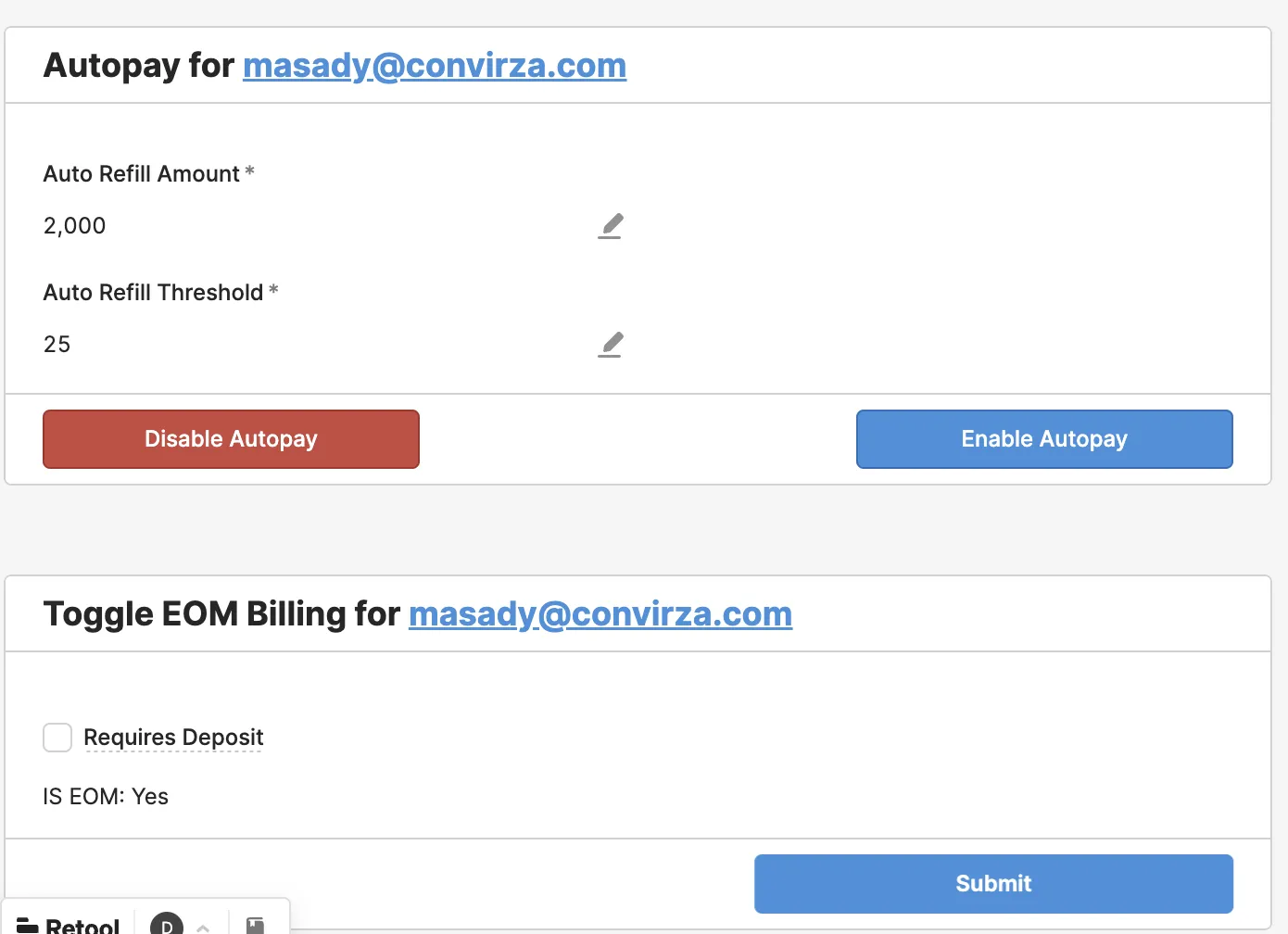
-
When the customer reaches a negative account balance, the customer will be throttled and receive an error message saying that their account balance is negative and they need to top up to continue using the API.
-
You can confirm this by searching for their account ID in Datadog and checking the logs for the following:
error triggered: Your current account balance is negative. Please top up to continue using the API
- Account details and deposit events can be viewed in Stripe using the Stripe customer id. This can be used to see their payment history.

In most cases, we can add $50 of complementary credit to the customer account in Retool. This will enable them to transcribe files again.
- This should only be done for the first occurrence. Subsequent throttling due to insufficient funds should be directed to add funds via their account page: https://www.assemblyai.com/app/billing
Resources
-
For checking with Engineering on high concurrency limits: #ask-engineering
-
API Support Manager: Lee Vaughn
-
Senior API Support Engineers: Michelle Asuamah, Dylan Duan, Martin Schweiger, Matt Lawler
-
Tool for gathering customer information: Retool
-
Tool for user insights: Datadog
-
Tool for viewing account billing history: Stripe