How to Add Credits to an Account
Introduction
This Playbook will cover how to add credits to an Account. These are typically requested by the Sales team in the #account-change-requests-and-refunds Slack channel via a SalesForce workflow. Requests made using these workflows are automatically added and don’t require any action for Support but there are instances where Support may need to manually add credits to an account. Examples include when the workflow fails to automatically add the credits, when an account also needs to be manually updated, or for certain special events like Hackathons.
Procedures
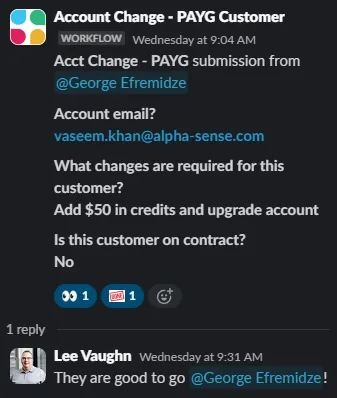
[Here is an example of a credit request surfaced in Slack:]{.mark}

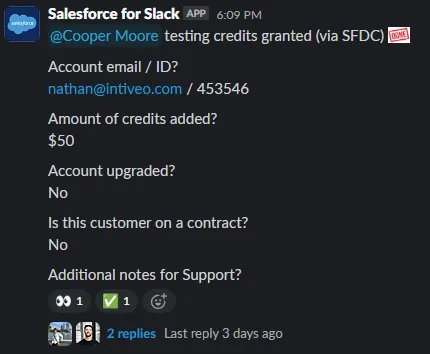
[Note: that the alert doesn’t say “testing credits granted” at the top, which would mean that the credits have already been added as shown in this example:]{.mark}
When handling one of these requests, add the 👀emoji to the post so that other SEs will know the request is being handled. Check out this [walkthrough video to see how to add credits to a customer’s account using Retool. Once you have added the credits, please add the ✅ or :done: emoji to the post and comment in the thread tagging the requestor letting them know the credits have been added.]{.mark}