
How To Process Playground Deletion Requests
Introduction
Playground audio files and transcripts are unable to be deleted by the user, so we sometimes receive requests to delete them on their behalf. This Playbook will detail the necessary steps to delete the audio and transcript.
Procedures
- Retrieve playground transcript ID from the customer.
Example - https://www.assemblyai.com/playground/transcript/[4d065f9d-359d-4f8d-8747-2e864e881036]{.mark}
- Reach out in #ask-web with the playground transcript ID to have the audio file deleted by a member from the Web team.
The audio_url is removed if the transcript is deleted first and the files are anonymized, making them hard to find, so this is carried out before deleting the transcript.
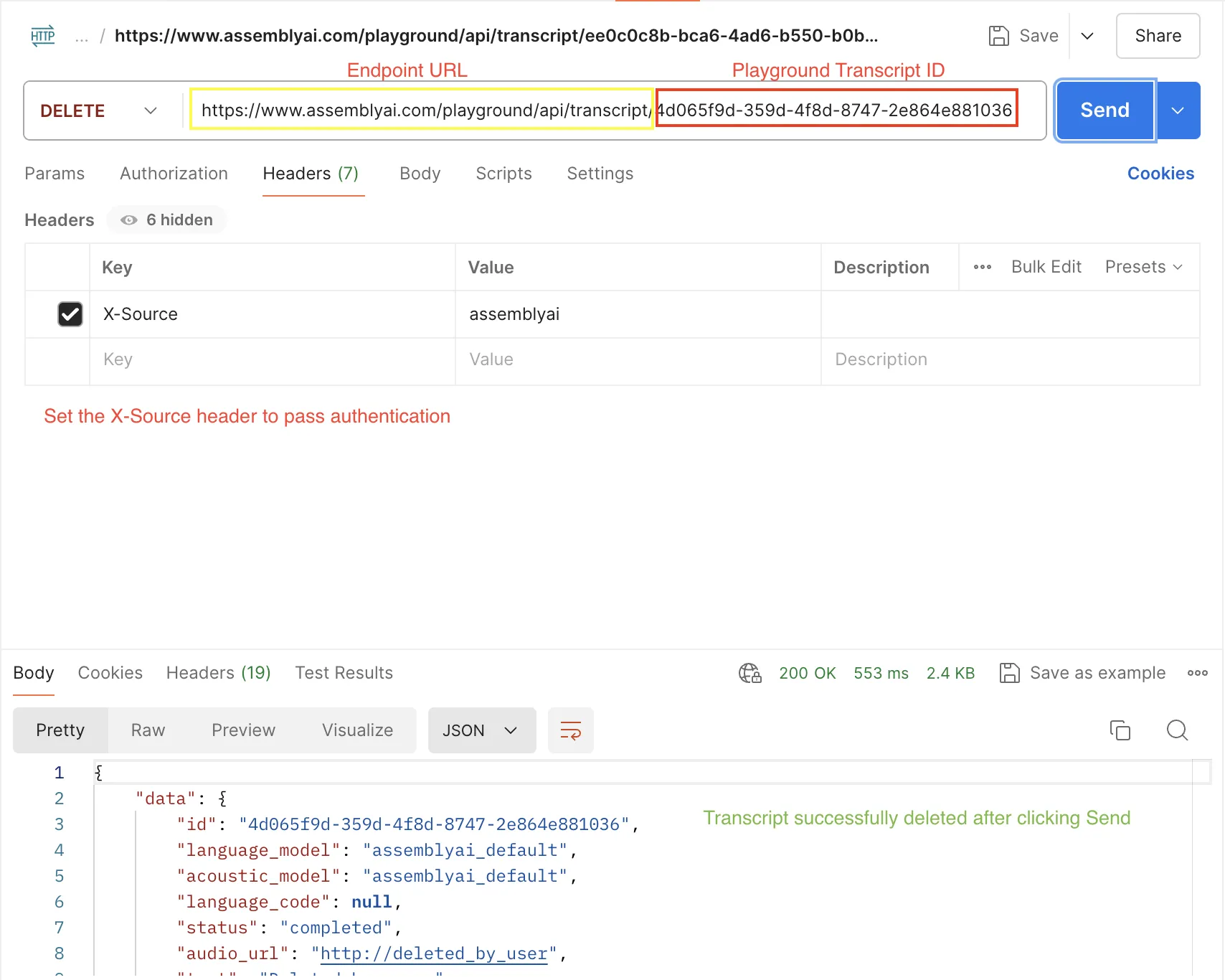
- Submit a DELETE request via HTTP to the playground endpoint ([https://www.assemblyai.com/playground/api/transcript/)]{.mark} with the transcript ID and an ‘X-Source’ header with a value of ‘assemblyai’. This header is in place as a layer of authentication.
It is recommended to set this up in Postman, for easy access in the future:
-
The audio file and transcript has now been successfully deleted!
-
If the customer isn’t already aware, report back advising not to upload sensitive audio files and that it should only be used as a testing tool before using our API.