
How to securely share files in Jira and other sources
Introduction
As a Support Engineer, you will often need to share customer files with other teams in the company. The most common example of this is including related files when reporting a new bug in Jira. For security and compliance reasons, we want to avoid uploading files to third-party tools like Jira. Instead, we should upload these files to a folder in our shared company Google Drive and then share a link to that drive.
Procedures
Files that you need to share with other teams should be uploaded to the Shared Files folder. This folder can be found in the Support folder inside the GTM folder.
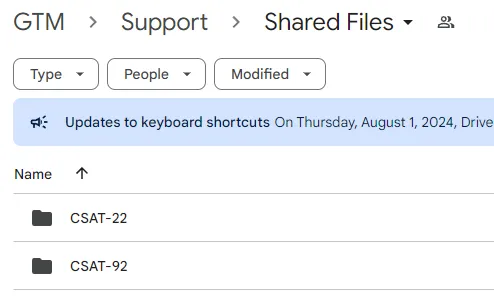
Sharing files for a Jira ticket
Here are the steps you should take when sharing files for a Jira ticket:
-
Create a Jira ticket to report the issue
-
Create a new folder in the Shared Files folder
-
Give that folder the name of the Jira ticket you created, example “CSAT-101”
-
Add any files related to the Jira ticket to the new folder you just created
a. Since files from different customers might sometimes get attached to the same Jira ticket, the name of the file should include the customer name to better be able to identify which files are from which customer, example “veed1.mp3”
-
Add a link to the folder you just created to the Jira ticket
a. Make sure that the sharing settings allow anyone at the company to access the folder and its contents
Sharing files for other purposes
While the most common reason to share files is when reporting a new bug in Jira, you may sometimes need to share files for other purposes. Here are some best practices for sharing files to keep in mind when sharing files for other purposes:
-
Create a new folder in the Shared Files folder
-
Name the folder something that represents what the files in that folder are for
a. Include the company name if applicable
b. Separate words in the folder name with underscores
c. Consider including a date (month/date/year) at the end of the file name if it might help differentiate similarly named folders in the future
i. Example: "fireflies_speaker_label_issues_2_18_24" -
Share a link to the folder as needed
a. Make sure that the sharing settings allow the target audience to access the folder and its contents