
How to Submit a Feature Request
Introduction
As a Support Engineer, you will often encounter inquiries for features that we do not currently offer. For example, “do you offer speaker diarization for Streaming speech-to-text?”. If these are from customers of ours (i.e. they have an account with us) we should surface them as feature requests.
Procedures
How you surface a feature request varies slightly depending on whether the customer is in Salesforce or not so we will cover each situation separately. You can tell if a customer is in Salesforce by checking the Account Details section of the Pylon issue.
Note: If the customer is in Salesforce and has a CSM assigned to their account, check with the CSM to see if they want to work with the customer on the feature request or have you handle it.
If the customer is in Salesforce…
-
In the Issue Details section of the Pylon issue…
-
Select “Missing Feature” and “Product” from the Ticket Topic dropdown
- If the request is related to a certain feature, i.e. additional language support for Universal, select the appropriate feature(s) as well
-
Select “Feature Request” from the Ticket Type dropdown
-
-
Go into Salesforce and search for the customer’s account
-
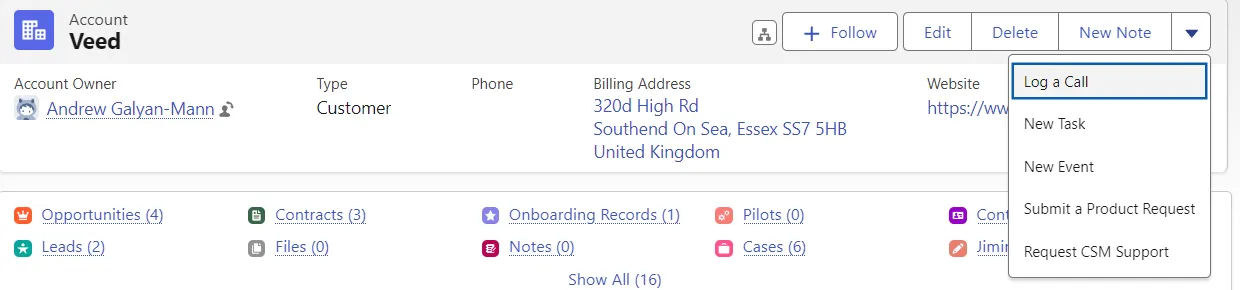
In the top left corner of the Salesforce account you will see a dropdown arrow, click that and select “Submit a Product Request”
-
Complete the form for the product request and click “Save”
-
Let the customer know that you have submitted a feature request for their request
-
Move the Pylon issue to the “On Hold” column on the issues view so that we can follow up with customer as needed about their request
If the customer is not in Salesforce…
-
In the Issues Details section of the Pylon issue…
-
Select “Missing Feature” and “Product” from the Ticket Topic dropdown
- If the request is related to a certain feature, i.e. additional language support for Universal, select the appropriate feature(s) as well
-
Select “Question” from the Ticket Type dropdown
-
-
Let the customer know that you have submitted a feature request, encourage them to follow the changelog to learn more about new features and improvements as they are released, and close the issue in Pylon